
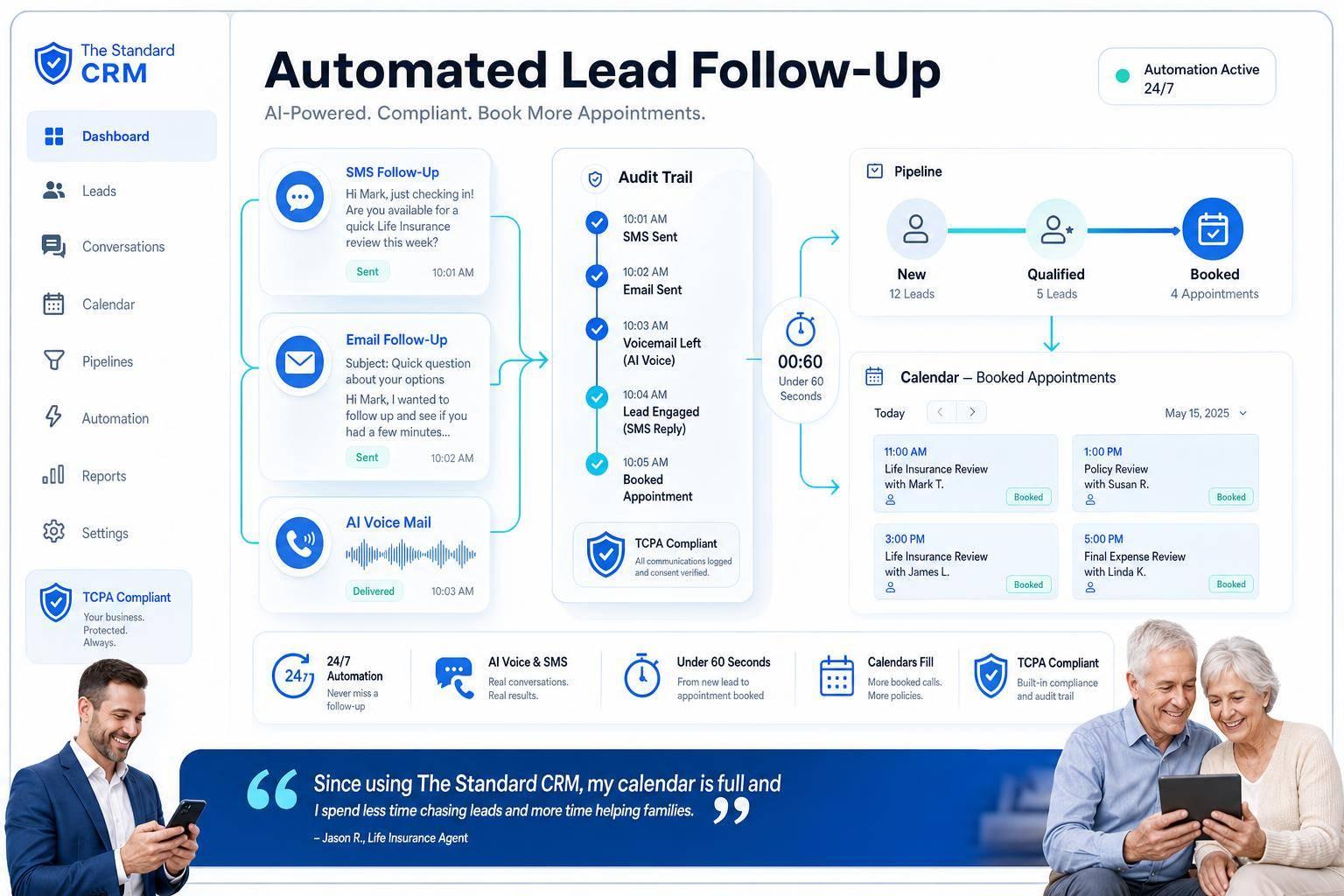
How to Automate Lead Follow-Up as a Life Insurance Agent
Want to close more life insurance sales? Automating your lead follow-up can make it happen.
Here’s the deal: responding to leads within 5 minutes makes you 21x more likely to qualify them than waiting 30 minutes. But most agents take hours, losing potential clients to competitors. Automation solves this by instantly sending texts, emails, or voicemails - day or night - keeping leads engaged while you focus on closing deals.
Key Takeaways:
- Speed matters: Leads contacted within 5 minutes convert far better than delayed responses.
- Automation tools: Use AI and CRM workflows to handle texts, emails, and calls automatically.
- Save time: Reduce repetitive tasks from 8–12 hours weekly to just 2–3 hours.
- Stay compliant: Capture explicit SMS consent and follow regulations to avoid legal risks.
- Boost results: Multi-channel workflows (SMS, email, voicemail) increase contact rates and conversions.
Automation doesn’t replace your role - it ensures every lead is followed up promptly, so you can focus on building relationships and closing sales. Let’s dive into how it works.
Automated Lead Follow-Up for Life Insurance Agents: The Basics
What Is Automated Lead Follow-Up?
Automated lead follow-up leverages AI and CRM workflows to deliver consistent, rules-based communication across various channels like SMS, email, phone calls, and voicemail - without manual effort. Here’s how it works: when a prospect fills out a quote form, the system captures the lead, adds it to your CRM, and initiates a customized sequence of multi-channel messages.
These messages are automatically tailored to include the prospect's name and their specific coverage interest, whether it's Term, Whole Life, or IUL. The system also tracks behavioral signals, such as repeated email opens or visits to product pages, to time follow-ups perfectly. By analyzing engagement patterns, the system optimizes its approach, making follow-ups more effective. This process not only simplifies communication but also increases engagement with leads.
Benefits for Life Insurance Agents
Inbound digital leads are far more effective than traditional cold calls, converting to issued policies at a rate 3.4 times higher across Term Life, Whole Life, and IUL categories. AI-powered systems further improve booking rates, achieving 15–25% conversion compared to the 1–3% rate typical of cold calling.
Another advantage is the time saved. Automation reduces the hours agents spend on repetitive outreach tasks - from 8–12 hours per week to just 2–3 hours. This extra time allows agents to focus on what truly matters: building client relationships and closing deals. As Brent Veazey from Agility explains:
"Automation is about giving you more space to be human with your clients. Letting technology handle the busy work allows you to spend more time building relationships, solving problems, and closing sales."
Compliance Considerations
Staying compliant with regulations is essential. To meet the TCPA and the FCC's 2024 one-to-one consent rule, you must capture explicit SMS consent for each lead and maintain a suppression list for opt-outs. This is particularly critical for leads from third-party sources, as they must include documented prior consent to avoid legal risks.
"Under the FCC's 2024 one-to-one consent rule, each lead source must include explicit consent for automated SMS and AI-generated outreach." - US Tech Automations
To ensure compliance, include a mandatory SMS consent checkbox on all web lead forms. Skipping this step could expose your agency to significant legal liabilities.
sbb-itb-b54a2b8
How Insurance Brokers Respond to New Leads in Seconds
How to Map Your Current Lead Management Workflow
Lead Follow-Up Speed vs. Conversion Rate for Life Insurance Agents
Before diving into automation, it’s crucial to understand how leads flow through your agency - especially where they tend to stall or fall through the cracks.
Identifying Your Lead Sources
Start by listing every channel that brings in leads. This includes website forms, inbound calls, third-party vendors like QuoteWizard or EverQuote, referral partners, and social media platforms. For each source, document how the data is captured and where it goes next.
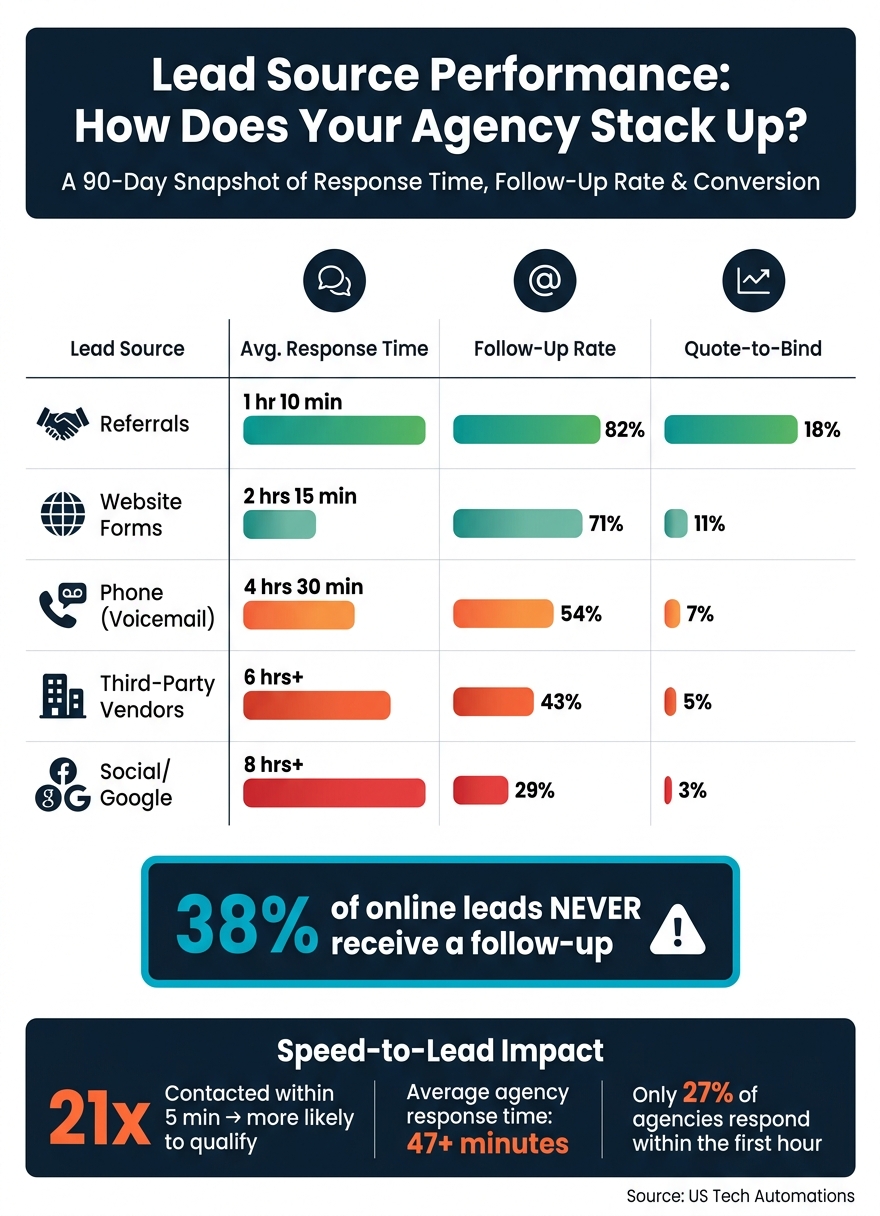
Here’s where a major issue often comes to light: nearly 38% of leads generated online never receive a follow-up. This is often due to leads landing in a general inbox without a clear process for follow-up. Once you’ve listed all your sources, group them into categories - like inbound digital leads, purchased shared leads, and referral-based leads - since each type requires different handling and urgency.
Analyzing a quick 90-day snapshot of your lead data by source can highlight performance gaps. Here’s an example of how different channels typically perform:
| Lead Source | Avg. Response Time | Follow-Up Rate | Quote-to-Bind |
|---|---|---|---|
| Website forms | 2 hrs 15 min | 71% | 11% |
| Phone (voicemail) | 4 hrs 30 min | 54% | 7% |
| Third-party vendors | 6 hrs+ | 43% | 5% |
| Referrals | 1 hr 10 min | 82% | 18% |
| Social/Google | 8 hrs+ | 29% | 3% |
(Source: US Tech Automations)
Referrals consistently outperform other lead sources, so it’s essential to track them separately and prioritize their routing.
Defining the Lead Lifecycle
Once you’ve pinpointed where your leads originate, it’s time to map out what happens after they arrive. A well-defined lead lifecycle includes clear stages, such as: New Lead → Contacted → Qualified → Appointment Set → Nurture. Unfortunately, many agencies skip critical steps, leading to an average of just 1.3 contact attempts per sale - far below the 6–8 touches typically required.
"Automation in insurance lead follow-up is not about replacing agents. It is about building infrastructure that ensures every lead receives immediate attention while producers focus on high-value conversations." - Garrett Mullins, Workflow Specialist, US Tech Automations
Introducing a lead scoring system can help you decide how much attention each lead needs. For instance, a referral from a mortgage broker with complete contact details might score 80+ and deserve an immediate call from a senior producer. Meanwhile, a partially completed third-party lead might score under 25 and only require an automated email to gather missing information.
With your lifecycle stages mapped, the next step is to establish clear response time goals for each type of lead.
Setting Response Time Goals
Here’s what the data tells us: leads contacted within 5 minutes are 21 times more likely to qualify than those contacted after 30 minutes. However, the average independent insurance agency takes over 47 minutes to respond to online leads, and only 27% of agencies reach out to inbound leads within the first hour.
Set your response time goals based on lead source. For example:
- Web form leads: Send an automated SMS or email within 5 minutes (ideally within 90 seconds).
- After-hours inquiries: Send an acknowledgment right away, such as "A licensed agent will call you by 9:00 AM tomorrow".
- Referral leads: While they can tolerate a slightly longer response time, aim to respond within 30 minutes during business hours.
"Speed-to-lead is not a buzzword. It is a measurable, revenue-determining metric." - US Tech Automations
The financial stakes are high. For an agency handling 200 leads per month, responding within 5 minutes can boost conversion rates to 38–42%. In contrast, waiting 48–72 hours for manual follow-up drops that rate to just 3–5%. Over time, this difference translates into hundreds of additional policies.
How to Build Effective Automation Workflows
Once you've mapped out your lead sources and set clear response time goals, the next task is creating workflows that help you meet those goals consistently - and without manual effort.
Immediate Response Automation
Every lead deserves an immediate reply. In 2026, the benchmark is a response time of under 60 seconds for web form submissions, inbound texts, and referral emails. With automation, this is entirely feasible.
"The cheapest, highest-leverage lever in a life insurance agency in 2026 isn't a better script. It's reducing time-to-first-touch from 30 minutes to 30 seconds." - Bharadwaj Giridhar, Founder, Tuco AI
The key is to match the lead's communication channel: respond to texts with texts and to web form inquiries with emails. Combine this with AI-powered personalization. For example, instead of a generic "Thank you for reaching out", try something like, "Hi Mark, I noticed you're exploring term life coverage for your family." Always include a clear next step, such as a link to schedule a 15-minute call.
"78% of consumers buy from the first agent to respond. Not the best agent. Not the cheapest carrier. The first responder." - Josh Kay, Founder, RenewalEngineAI
These automated responses not only align with your response time goals but also set the stage for consistent follow-ups across multiple channels in the days ahead.
Multi-Channel Follow-Up Sequences
Most prospects need 5–7 touchpoints before making a decision. Your workflow should ensure consistent engagement across different channels during the critical first week. Here's an example sequence:
| Day | Channel | Purpose |
|---|---|---|
| Day 0 (Immediate) | SMS + Email | Acknowledge the inquiry and provide a calendar link for booking a call |
| Day 1 | Voicemail Drop | Add a personal touch with a message from the assigned producer |
| Day 2 | Share educational content, like "3 Things Most People Miss in a Life Insurance Policy" | |
| Day 3 | SMS | Check in briefly to reinforce value |
| Day 5 | Provide social proof, such as client testimonials or a soft deadline reminder | |
| Day 7 | Task/Alert | Escalate to a producer for a personal call if the lead remains uncontacted |
A real-world example: In early 2026, a 12-agent independent agency implemented a similar multi-channel workflow. Within just 60 days, their lead contact rate soared from 38% to 79%, and their quote conversion rate climbed from 14% to 31%. The number of leads going cold each week dropped from 45 to only 8.
To maximize engagement, schedule automated emails during optimal times - 9–11 AM and 1–3 PM in the lead's time zone. Also, space nurture emails at least 48 hours apart to avoid overwhelming prospects.
Once your short-term workflows are in place, focus on nurturing undecided leads over the long term.
Long-Term Nurture Campaigns
Not every lead is ready to commit immediately - and that’s okay. Studies show that 68% of insurance purchases happen within 14 days of the initial inquiry. This means a solid portion of your pipeline benefits from ongoing nurturing.
For these leads, set up a 14–21 day sequence with 6–10 touchpoints. Use this time to share educational content, such as guides on how coverage gaps can impact families, comparisons between term and whole life insurance, or tips for reviewing policies. Personalizing this content based on the lead's specific inquiry can increase engagement rates by 45% compared to generic messages.
One crucial rule for long-term nurture campaigns is to include an exit trigger. If a lead responds or a producer logs a conversation, the sequence should immediately pause. Nothing erodes trust faster than receiving a follow-up message after you've already spoken with someone.
Appointment Reminders and No-Show Handling
Securing appointments is only half the battle - you also need to reduce no-shows. Use a clear reminder system: send an immediate confirmation, a 24-hour SMS reminder, and a final 1-hour text reminder before the appointment.
If a lead misses their appointment, follow up right away with a rescheduling link. If they remain unresponsive, re-engage with a brief sequence after 24 hours to keep the conversation alive.
How to Use The Standard CRM to Automate Lead Follow-Up
For automation to work seamlessly, your tools need to handle tasks reliably. The Standard CRM is designed with life insurance agents in mind, featuring AI-powered engagement, multi-channel communication, and built-in compliance safeguards.
Setting Up Lead Capture and Routing
Start by assessing all your lead sources - whether they’re website forms, aggregators like EverQuote and Zing, carrier portals, or referral emails. Use webhooks or API connectors to link these sources directly to The Standard CRM. For email-based leads, email parsers can extract contact details automatically, saving you from manual data entry. Then, create routing rules to assign leads based on criteria like product type (e.g., term life or IUL), zip code, or lead source. This ensures the right agent handles each lead from the very beginning.
Configuring AI-Powered Engagement
Once your lead capture is set up, activate The Standard CRM’s AI to respond to new leads within 90 seconds via SMS, email, or voice. The AI takes the first step by asking 4–5 qualifying questions, such as the type of coverage needed, current policy details, household income, and timeline. This process filters and scores leads before they even make it to an agent’s calendar.
The system also tracks behavioral cues - like when a prospect repeatedly opens an email or revisits a product page - and triggers a personalized follow-up message automatically. These automated communications use personalization tokens, incorporating details such as the prospect’s first name, insurance type, and the assigned agent’s name, to keep the tone conversational and engaging.
"Automation is about giving you more space to be human with your clients. Letting technology handle the busy work allows you to spend more time building relationships." - Brent Veazey, Agility Blog
From here, you can take your outreach to the next level with structured follow-up workflows.
Building Advanced Follow-Up Workflows
After the initial automated engagement, organize your follow-up efforts into different stages. Begin with an immediate response within 90 seconds, followed by a nurturing sequence over the next 7 days using calls, SMS, and voicemail drops. If a lead remains unresponsive, shift to a long-term nurture sequence starting on day 14, using email and SMS.
Once a quote is sent, implement a post-quote follow-up plan, reaching out on days 1, 3, 7, and 14 to help close the deal. To improve results, experiment with varying contact times - like trying Tuesday mornings versus Thursday afternoons - and include a final “breakup” message around day 14 to signal that the lead file is being closed.
"More than half of all conversions happen after the fifth contact attempt, and the curve doesn't flatten until attempt eight." - Clean Leads 365 Team
Ensuring Compliance with Automation
The Standard CRM makes staying compliant straightforward. Every automated SMS campaign requires opt-in confirmation at the point of lead submission, and the platform keeps a suppression list for prospects who opt out. Automated calls follow pre-approved scripts that align with regulatory standards, and every interaction is logged to ensure there’s a clear documentation trail. For agents working in two-party consent states, the platform also includes built-in disclosure workflows to help avoid legal issues.
How to Measure and Improve Your Automation Results
Once you've set up your automation workflows, the next step is just as important: measuring how they perform and making adjustments to keep things running smoothly.
Key Metrics to Track
To fine-tune your automated workflows, keep an eye on these metrics. One of the most important is speed-to-lead - how quickly your system reaches out after a lead comes in. Ideally, this should be under 5 minutes. Other key metrics include contact rates, appointment rates, and conversion rates. For email campaigns, aim for open rates between 30–45% and reply rates of 2–5%. If your results fall short of these benchmarks, it might be time to tweak your messaging or adjust the timing of your follow-ups.
Using Data to Refine Workflows
Data is only useful if you act on it. Start by pinpointing where leads drop off in your funnel. For instance, if your contact rate looks good but appointments are lagging, you might need to revisit your qualifying questions or refine your follow-up communication. On the other hand, if quotes are being sent but aren't converting, take a closer look at your post-quote follow-up process and timing.
Instead of relying solely on fixed intervals, leverage behavioral triggers. For example, if a prospect opens your email multiple times within 48 hours, that should prompt a personalized follow-up instead of waiting for the next scheduled touchpoint. Regular audits and A/B testing - such as experimenting with subject lines or send times - can also help keep your workflows effective.
A real-world example: A 12-agent independent agency saw impressive results by refining its workflows. After implementing automated follow-ups, their contact rate jumped from 38% to 79%, and their quote conversion rate increased from 14% to 31% in just 60 days. For this agency, handling 80 leads per week, these improvements meant approximately 55 additional policies quoted weekly and over $156,000 in new annual premium.
Once your workflows are optimized, you can start expanding your automation strategy.
Scaling Automation as You Grow
As your metrics improve, use these insights to scale your automation efforts. Start by testing your strategy on one high-volume product line - term life insurance is a good candidate - before branching out into areas like renewals, policy reviews, and cross-selling. For example, AI-driven renewal campaigns can lower policy lapse rates by an average of 19%, while cross-sell automation can add about 0.6 additional policies per household each year.
Don't overlook older leads, either. Set up a reactivation sequence for leads that have gone stale - around the 60-day mark - with refreshed rates and a personalized reintroduction from the assigned agent. As your lead volume grows, consider using AI lead scoring to help your top producers focus on the most promising prospects.
"Most agencies that plateau in lead gen aren't failing to attract leads. They're failing to measure what happens after the lead arrives." - CallBack CRM
Conclusion: Take Control of Your Lead Follow-Up with Automation
The clock is ticking when it comes to lead follow-up. Studies reveal that leads contacted within 5 minutes are far more likely to convert, while those left uncontacted after 30 minutes are often lost for good. For agents working without automation, this narrow window can feel impossible to meet.
The solution isn’t about working longer hours - it’s about working smarter. Automation takes care of time-critical tasks like sending texts, emails, voicemails, and reminders. This doesn’t just save you hours every week; it also gives you the freedom to focus on what really matters: connecting with clients, building trust, and closing deals.
"Automation is about giving you more space to be human with your clients. Letting technology handle the busy work allows you to spend more time building relationships, solving problems, and closing sales." - Brent Veazey, Agility
The Standard CRM is designed to make this process seamless. Its AI tools can respond to leads within seconds using voice, SMS, and email. It qualifies prospects, schedules appointments, and keeps your pipeline moving - all without requiring manual input. Whether you’re a solo agent or managing a team, this system works for you.
Don’t let another opportunity slip through the cracks. Start automating your lead follow-up today. Begin with your most active product line, track the results, and expand from there.
FAQs
What’s the best first message to send a new life insurance lead?
The best first message should be prompt, personalized, and action-oriented. Here's an example:
"Hi [First Name], this is [Your Name] from [Company]. I noticed your recent quote request and can prepare three personalized options for you. Would you like me to text them over, or should we schedule a quick 10-minute call?"
A quick response like this, paired with a clear call to action, can make a big difference in engagement.
How do I automate follow-up without violating TCPA rules?
To automate follow-ups while complying with TCPA regulations, start by securing prior express written consent from prospects. This can be done through a transparent opt-in process, such as having them check a box or sign a form. Make sure to document this consent thoroughly, including timestamps, IP addresses, and the exact opt-in language used.
Additionally, scrub your contact lists against both the National and state Do Not Call (DNC) registries to avoid contacting restricted numbers. Always provide a clear opt-out option, such as allowing recipients to reply with "STOP", and ensure opt-out requests are processed without delay. Before sending any automated messages, double-check that you have valid consent for each recipient.
Which lead sources should I prioritize for automation?
When it comes to generating leads, prioritize sources that are precise, easy to qualify, and work seamlessly with automation tools. Some of the best options include:
- Website forms: These allow visitors to share their information directly, often signaling interest in your product or service.
- Landing pages: Designed for specific campaigns, these pages capture leads who are already interested in a particular offer or message.
- Social media ads: Platforms like Facebook and LinkedIn let you target specific demographics, ensuring your ads reach the right audience.
- Referral sources: Leads from referrals often come with built-in trust, making them more likely to convert.
These channels tend to attract engaged prospects who are easier to guide through the sales funnel. By integrating AI tools, you can respond quickly, nurture leads effectively, and improve overall engagement.