
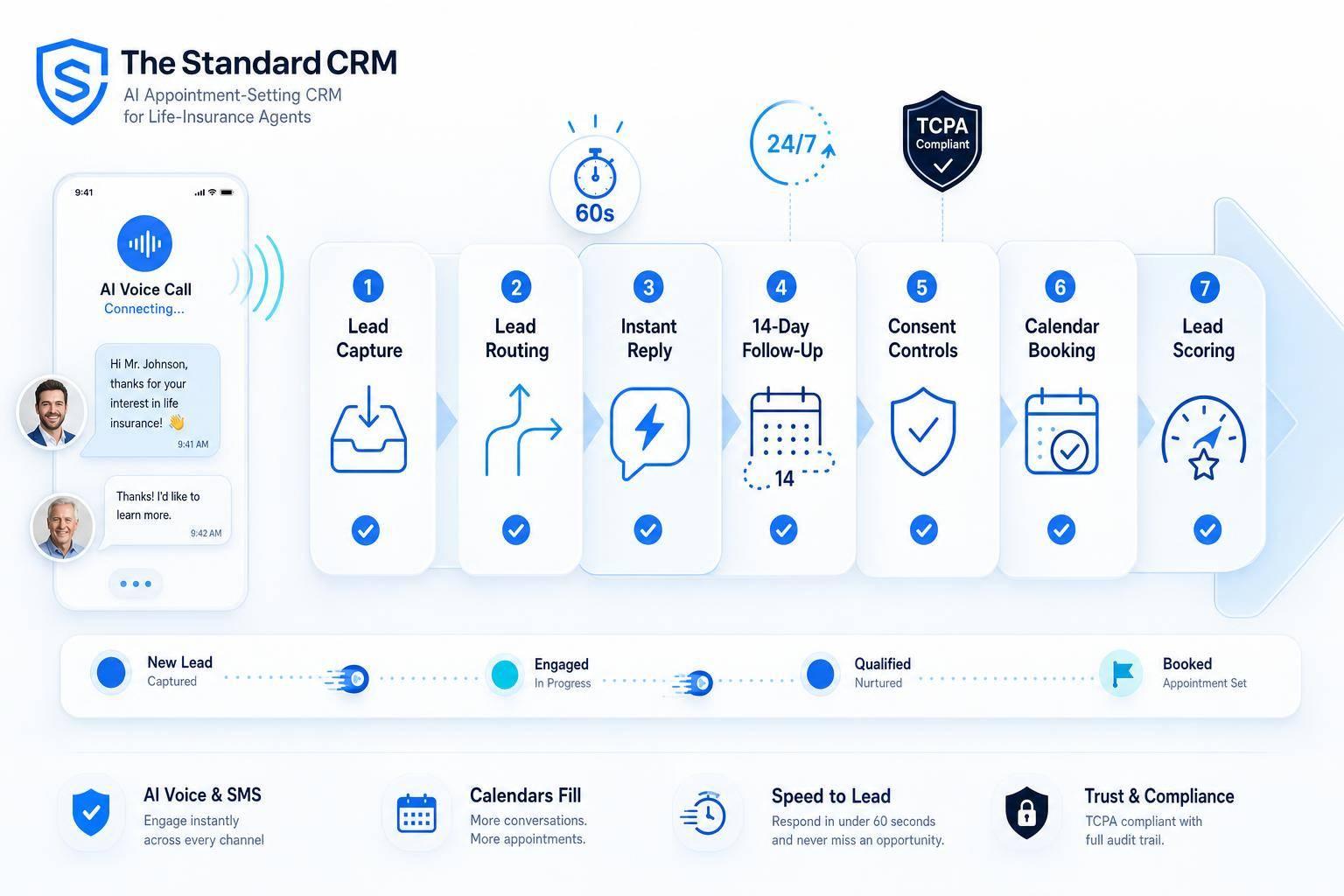
Checklist: Setting Up Automated Lead Engagement for Agents
If I reply to a new lead in under 5 minutes, I can be up to 100x more likely to make contact than if I wait 30 minutes. That is the big takeaway here.
This checklist boils lead engagement down to a simple setup:
- I send every lead into one CRM flow with the same fields
- I route each lead to the right agent in about 10 seconds
- I trigger a first reply right away, with a goal of under 60 seconds
- I keep follow-up running for 14 days with 5 to 12 touches
- I stop messages the moment a lead replies, books, is bound, or is disqualified
- I connect calendars so booking, reminders, and follow-up pauses happen on their own
- I store consent records, honor 8:00 AM to 9:00 PM local contact windows, and keep opt-outs synced across channels
- I score leads so hot leads get first attention and cold leads shift into nurture
- I review contact rate, appointment rate, bind rate, task completion, DNC scrubs, and opt-out rates every month
A few numbers stand out. Leads reached within 5 minutes can convert at 9x the rate of leads reached after 30 minutes. Appointment reminders can cut no-shows by 30%+. TCPA penalties can run $500 per violation or $1,500 for willful violations.
Here’s the short version: clean intake, fast routing, tight follow-up, booked appointments, and strict consent checks. If I miss any one of those, the rest of the system starts to break down.
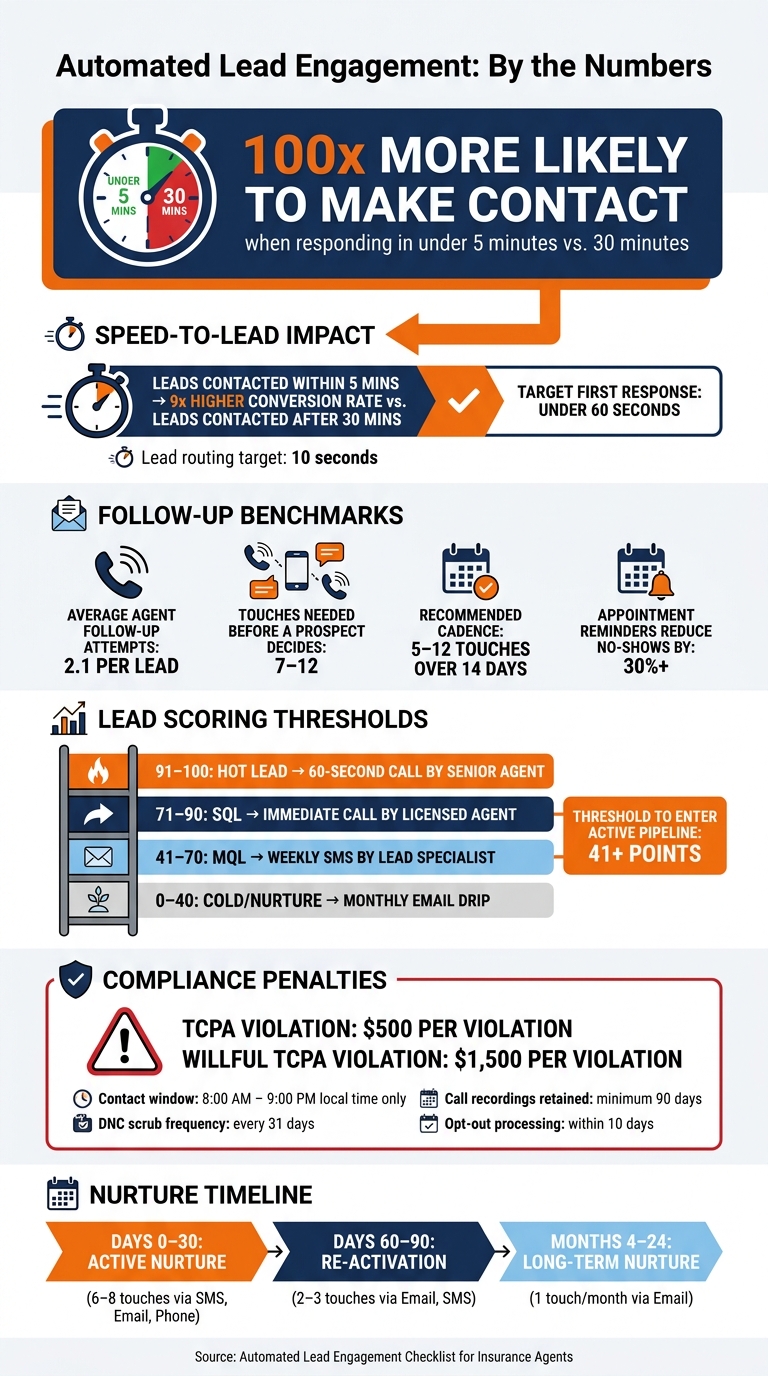
Automated Lead Engagement: Key Stats & Speed-to-Lead Impact
🔥How To Close More Sales Using a Lead Engagement Scoring System
sbb-itb-b54a2b8
Lead Capture and Routing Setup
Send every lead into one CRM queue, using one record format, before you automate anything else.
Connect Every Lead Source
Start by listing every place a lead can come from: web forms, landing pages, referral forms or emails, inbound calls, social ads, and third-party lead vendors or aggregators. Then connect each source so leads flow straight into The Standard CRM.
For each source, make sure it sends the same core fields in the same format:
| Field Category | Required Fields | Format |
|---|---|---|
| Identity | First Name, Last Name, DOB, State | Consistent formatting |
| Contact | Phone, Email, Best Time to Call | U.S. format: XXX-XXX-XXXX |
| Source | Campaign Name, Vendor, Lead ID | For attribution tracking |
| Compliance | Consent Timestamp, Consent URL, Token | TrustedForm or Jornaya tokens |
| Insurance | Product Interest, Coverage Amount, Tobacco Use | Coverage in $; Tobacco as Yes/No |
| Status | Disposition, Lead Score, Assigned Agent | Kept current |
Use API connections for vendors so leads sync straight into the CRM. After each source is connected, submit a test lead and check the record field by field. Every required field should appear and be filled in. If even one field is blank, fix the source mapping before you move on.
Set Routing Rules for Agents, Teams, and Territories
Once leads are coming in, they need to reach the right agent fast. Set routing logic based on how your agency works:
- Round-robin for teams where agents handle the same product lines and territories
- Territory-based routing by ZIP code or state
- Product-based routing for lines such as Medicare or final expense
- Priority routing for high-intent leads like live transfers
Auto-assign new leads within 10 seconds of arrival. Set owner caps too, so one agent doesn’t get buried while another has nothing in the queue. If no contact attempt is logged within 48 hours, set an automatic reassignment rule that passes the lead to the next available agent or sends it up to the agency principal. Every assignment should also trigger an instant alert by SMS, push, or dashboard notice, so the agent sees it right away.
Routing should also respect the prospect’s local time zone, based on ZIP code or area code. That way, calls only go out between 8 AM and 9 PM local time.
Once assignment runs on its own, the next step is to define how the CRM reacts to each new lead.
Build a Standard Lead Record Layout
The lead record should show the main details at a glance: contact info, lead status, lead score, product interest, last contact timestamp, and next scheduled appointment.
For life insurance, add custom fields to every record for date of birth, tobacco use (Yes/No), coverage amount, health indicators, and underwriting notes. Those fields give agents what they need for a more personal first call and help them move from contact to quote with less back-and-forth.
Set a data-quality alert as well. If a required field comes in blank, send a notice to an admin instead of letting a bad record set off bad automation. Clean intake here saves a lot of cleanup later.
With clean records and routing in place, define the first-response trigger and follow-up sequence.
Engagement Rules and Appointment Automation
Once your records are clean and routing is set, the next move is simple: tell The Standard CRM what to do the second a lead comes in, and what should happen if nobody responds.
Set Speed-to-Lead Targets and Response Triggers
After routing is live, set clear response timing and backup actions for missed contact.
Use a 60-second response target for new leads. Create one trigger for each lead type, and alert a manager if no contact is logged within 60 seconds during business hours.
The second a lead enters the queue, trigger:
- an intro text with a digital contact card
- a welcome email
- a call task for the assigned agent
If there's no answer, send a voicemail, a text, and a 30-minute callback task. Each automated message should mention something specific from the lead form, like the coverage type or a household detail they picked. That small detail makes the outreach feel personal instead of robotic.
| Lead Type | Target Response Time | Allowed Channels |
|---|---|---|
| Web Form / Ad-Click | < 60 seconds | SMS, Email, AI Voice |
| Inbound Text | < 60 seconds | SMS |
| Phone Call (Business Hours) | < 30 seconds | Phone |
| After-hours call | < 60 seconds | AI voice + SMS |
| Referral Email | < 60 seconds | Email, SMS |
| Social Media DM | < 5 minutes | DM, SMS |
Configure Multichannel Follow-Up Rules
Here's the gap most teams miss: insurance agents average only 2.1 follow-up attempts per lead, while prospects often need 7 to 12 touchpoints before they decide to buy.
Set a default sequence that begins with an instant SMS, then a welcome email within 8 to 15 minutes, followed by the first call attempt soon after. Don't fire every channel at once. Spread them out by at least a few minutes on day one, then rotate channels across the next several days. A 14-day cadence with 5 to 12 touches across calls, SMS, and email is a solid baseline.
Lock in quiet hours so no automated or manual outreach goes out before 8:00 AM or after 9:00 PM in the prospect's local time zone. Every sequence also needs stop rules. The moment a lead replies, books an appointment, or their status changes to "Bound" or "Unqualified," all automated follow-up should pause right away.
If a lead still hasn't bound by day 30, move them from the active pursuit sequence into a monthly long-term nurture track automatically.
After the active sequence ends, send nonbuyers into booking and nurture automation.
Connect Calendars and Automate Appointment Booking
Fast booking connects that first response to an actual scheduled conversation.
Add each agent's calendar link to SMS and email, and sync each calendar to stop double booking. Check every agent's working hours, and make sure booked meetings automatically pause follow-up sequences. When a prospect books, send a confirmation message right away, then trigger two reminders: one 24 hours before the meeting and one 1 hour before.
Automated reminders can cut no-show rates by 30% or more. Before the call, send the assigned agent the intake data, product interest, and any prior notes.
Templates, Compliance, and Personalization
Once routing and follow-up are live, lock down the messages, consent checks, and merge fields each workflow will use. Before anything goes out, load the templates, consent rules, and personalization fields tied to each workflow.
Create SMS and Email Templates for Key Lead Stages
Start with the first few touches in the lead journey: an immediate reply, a welcome email, a Day 1 check-in, and a Day 3 coverage comparison email.
For the first SMS, mention the exact coverage type the lead asked about. For example: "Hi [First Name], got your IUL quote request." Then set a clear expectation for a call within 15 minutes. That small detail matters. Personalizing the first touch can improve open and reply rates by up to 60%.
Your welcome email should confirm receipt and show why your agency is worth hearing from, including agency credibility and how many carriers you represent.
| Template Type | Timing | Channel | Primary Goal |
|---|---|---|---|
| Immediate Reply | 0–5 Minutes | SMS/Email | Confirm receipt and establish speed-to-lead |
| Coverage Comparison | Day 3 | Compare out-of-pocket exposure vs. premium | |
| Producer Call Task | Day 7 | CRM Task | Human handoff for warmed-up prospects |
| Rate-Lock/Discount | Day 14 | Create urgency with time-sensitive incentives | |
| Long-Term Nurture | Monthly | Email/SMS | Maintain top-of-mind awareness for 24+ months |
Use the same template library to apply opt-out and disclosure rules before every send.
Add Consent, Opt-Out, and Call-Recording Controls
For SMS, make sure you have prior express written consent and A2P 10DLC registration in place. Every SMS should include opt-out language like "Reply STOP to opt out", and every automated voice script should open with a call-recording disclosure such as "This call may be recorded".
Under the FCC's 2024 one-to-one consent rule, consumers must give explicit, individual consent that names your specific agency. Generic "partner" language is noncompliant.
Inside The Standard CRM, store the consent URL, disclosure snapshot, and TrustedForm or Jornaya token on every lead record. If any of those fields are missing, alert an administrator before outreach goes out.
For email, include:
- A physical office address in the footer
- A one-click unsubscribe link
- Opt-out processing within 10 days
Do-not-call requests should carry across SMS, email, and voice within 24 hours, and the suppression list should be re-scrubbed every 31 days.
TCPA violations can result in penalties of $500 per violation, rising to $1,500 if the violation is deemed willful. One bad template setup sent to a suppressed contact can create risk you don't need.
Map Personalization Fields and Handoff Notes
At a minimum, map first name, state, product interest, quoted premium, assigned producer, and carrier name into your templates. Also store qualification answers like health status, income band, and best time to call in the lead record.
For the pre-call brief, surface appointment notes and engagement history, including opened emails, clicks, and replies. That gives the producer context before they pick up the phone.
When a prospect replies, pause the sequence right away and create a priority task with the full interaction context. Before any message is sent, run a pre-send validation to flag missing required fields at the template level and alert an administrator so the record can be fixed first.
Those fields should also feed lead scoring and re-engagement rules.
Lead Scoring, Re-engagement, and Performance Review
Define Qualification Criteria and Lead Scoring Rules
Scoring turns clean intake, routing, and follow-up into clear priorities. The key is simple: use the same record fields and handoff notes to score, route, and sort each lead.
Not every lead needs the same response time. Higher-scoring leads should go first. Everyone else can move into a timed nurture track.
Split leads into MQL (Marketing Qualified Lead) and SQL (Sales Qualified Lead). An MQL fits basic demographic filters - age, income band, ZIP code - and has shown early interest, such as downloading a coverage guide or opening 3+ emails. An SQL has taken a stronger action: submitted a quote request, booked an appointment, or shared health status flags plus a product focus like Medicare, IUL, or Final Expense.
Give more weight to full quote requests than partial forms, SMS replies than email opens, and specialized coverage interest than broad inquiries.
You can assign points like this:
- Submitted quote request: +15
- Visited pricing page: +10
- Downloaded a coverage guide: +8
- Opened 3+ marketing emails: +5
- No activity for 60+ days: −8
- Unsubscribe: −10
Once a lead passes 41 points, move it into the active sales pipeline automatically.
Your score bands should connect straight to ownership and response time. Here’s the score-to-action map:
| Score Range | Lead Status | Next Action | Assigned Role |
|---|---|---|---|
| 91–100 | Hot Lead / Quote Request | 60-second speed-to-lead call | Top Producer / Senior Agent |
| 71–90 | SQL (Sales Qualified) | Immediate call + appointment request | Licensed Agent |
| 41–70 | MQL (Marketing Qualified) | Weekly SMS + educational content | Lead Specialist |
| 0–40 | Cold / Nurture | Monthly educational email drip | Automation / Marketing |
Send 91–100 leads to senior agents or top producers. If a hot lead sits untouched, move it up to a manager.
Build Re-engagement and Long-Term Nurture Workflows
When a lead stops replying, the score and status should shift it out of active pursuit and into nurture on their own.
Use a 30-day nurture sequence to win back unresponsive leads. Run an active sequence over those first 30 days with 6–8 touches before shifting the lead into long-term nurture.
After day 30, slow the pace to no more than 2 touches per month during months 2–24. If a lead goes 60+ days with no activity, trigger a reactivation sequence with 2–3 touches through email and SMS. Keep the message light and centered on whether their situation has changed.
| Sequence Type | Timing | Channel Mix | Primary Goal |
|---|---|---|---|
| Active Nurture | 0–30 Days | SMS, Email, Phone (6–8 touches) | Bind Policy / Quote |
| Re-activation | 60–90 Days | Email, SMS (2–3 touches) | Re-quote / Check Interest |
| Long-Term Nurture | 4–24 Months | Monthly Email (1 touch) | Education / Brand Awareness |
Review Dashboards and Run a Monthly Automation Audit
Once these sequences are live, check if the automation is turning into contacts, appointments, and binds. Set aside 15–20 minutes each month to review results inside The Standard CRM.
Track the numbers that show whether the system is doing its job:
- Speed-to-contact
- Contact rate
- Appointment set rate
- Show rate
- Bind rate
- Sequence completion rate
One metric deserves extra attention: speed-to-contact distribution. Inbound insurance leads contacted within 5 minutes convert at 9x the rate of leads reached after 30 minutes. That’s not a small gap. It can be the difference between a lead that closes and one that goes cold.
Also watch Task Completion Rate. This tells you whether agents are finishing the manual calls your automation creates, like the Day 7 producer follow-up.
On the compliance side, make sure the 31-day DNC scrub is active and that call recordings stay on file for at least 90 days. Flag opt-out rates above 2%. That usually points to a template issue or a targeting miss worth fixing before the next send cycle.
FAQs
What should I automate first?
Start with lead capture and assignment. Every new prospect should be logged, scored, and sent to the right agent right away. That speed matters. Responses within five minutes are far more effective than waiting 30 minutes.
Then set up your immediate reply. A confirmation email and SMS let the prospect know you got their inquiry and that someone is on it. After that, add appointment reminders to cut down on no-shows.
How do I keep automated outreach compliant?
Use your CRM as the source of truth for consent. That means keeping a stored disclosure snapshot and an opt-in token for every lead, so you can show exactly what each person agreed to and when.
Your system should also enforce TCPA and CAN-SPAM rules automatically. Respect DNC lists, sync suppression lists across workflows within 24 hours, and honor opt-outs right away. For SMS, include STOP instructions in every message. For email, add a physical address and a one-click unsubscribe link. And for automated calls, stick to the 8:00 AM–9:00 PM window in the recipient’s local time.
When should a lead move into long-term nurture?
Move a lead into long-term nurture when they’re not ready to buy now but still have a shot at becoming a prospect later.
This usually happens when a policy is still unbound 21 to 30 days after a quote, after an initial 7-day outreach sequence with no contact, or when the lead is disqualified from active short-term follow-up.
At that point, shift them to a low-frequency cadence with monthly updates and educational content.