
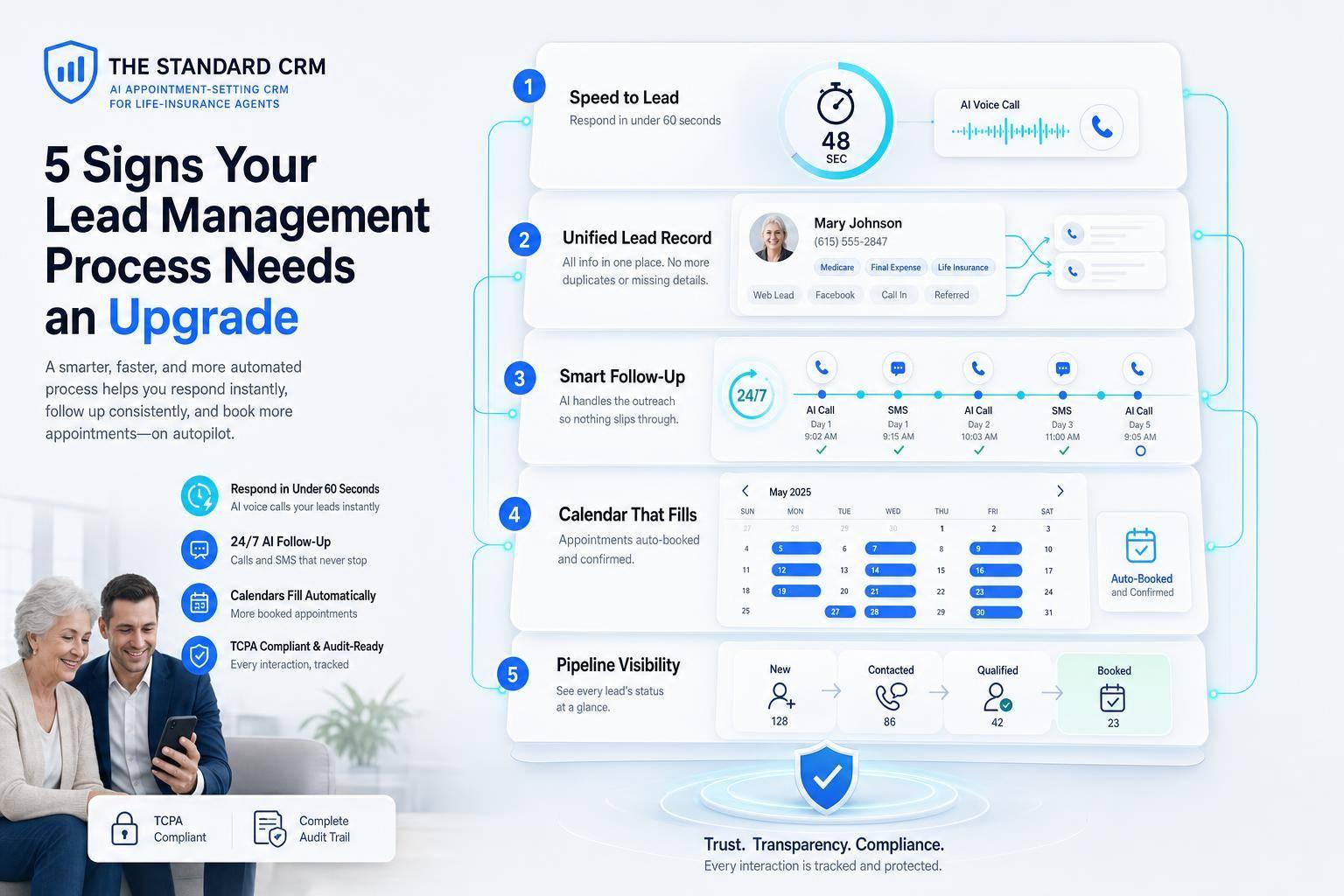
5 Signs Your Lead Management Process Needs an Upgrade
If your team takes too long to reply, misses follow-ups, or loses track of leads, your sales process is leaking money. In life insurance, a lead contacted within 5 minutes is far more likely to turn into a real sales conversation, and many buyers decide within 48 hours. That means small process problems can turn into lost appointments, lost policies, and lost premium fast.
Here’s the short version of what to watch for:
- Slow response times that let hot leads go cold
- Lead details spread across tools like spreadsheets, inboxes, and notes
- Follow-up done by memory instead of a set system
- Messy scheduling that leads to delays, no-shows, or double-booking
- No clear pipeline view and weak compliance tracking
If I see even two or three of these at once, I know the process needs work. The fix is usually simple in concept: keep every lead in one place, reply right away, set follow-up rules, tighten scheduling, and track pipeline status and consent records in one system.
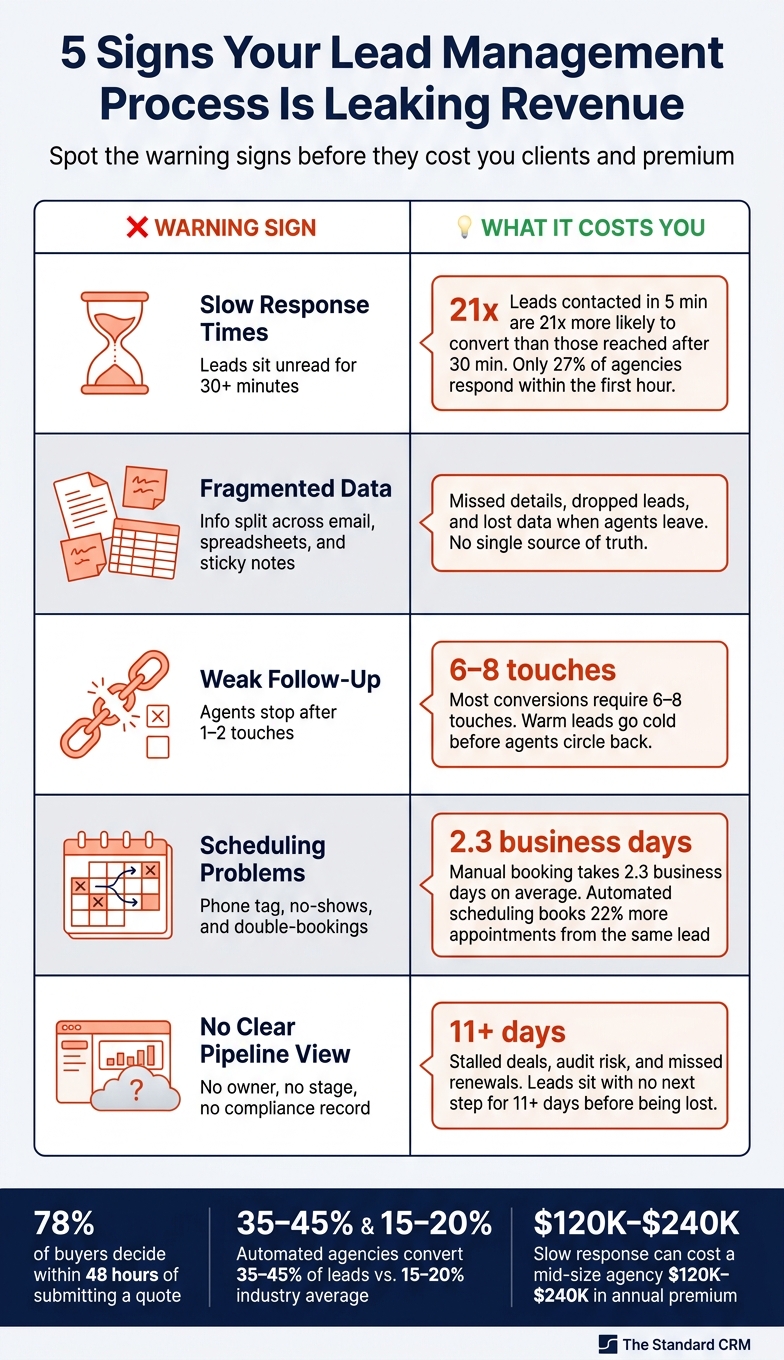
5 Signs Your Lead Management Process Is Leaking Revenue
Quick Comparison
| Warning sign | What it looks like | What it costs |
|---|---|---|
| Slow response | Leads sit for 30+ minutes or more | Lower contact and quote rates |
| Scattered records | Info lives in email, spreadsheets, and notes | Missed details and dropped leads |
| Weak follow-up | Agents stop after 1–2 touches | Warm leads go cold |
| Calendar problems | Phone tag, no-shows, double-bookings | Fewer appointments held |
| No visibility | No clear owner, stage, or compliance record | Stalled deals and audit risk |
This article breaks down each sign in plain English so I can spot where the process is slipping and what needs to change first.
sbb-itb-b54a2b8
Why Lead Management Breakdowns Hurt Life Insurance Sales Faster Than Most Agents Realize
Life insurance leads show up all day and all night. They come from Facebook Ads, website forms, referrals, and purchased lists, often when agents are already busy with service work and renewal tasks. At that point, manual tracking just can't keep up.
Speed matters here because the buying window is short. 78% of consumers who submit a quote request make their purchase decision within 48 hours. If that first touch comes late, the lead is often already gone.
The gap between fast follow-up and slow follow-up is bigger than many agents expect. Agencies that use automated systems convert 35–45% of leads, while the average agency converts only 15–20%. That difference hits the bottom line hard. A mid-size agency can lose $120,000 to $240,000 in annual new business premium due to slow response times. Put simply, response speed shapes revenue.
Things get even messier when those rules are tracked by hand. The odds of missed follow-up and compliance mistakes climb fast. Manual tracking also makes it easier to miss follow-up steps and opt-out rules.
The first crack usually shows up when response times drift past the window that turns inquiries into appointments.
1. Your Response Times Are Too Slow
Speed to lead can make or break the sale. In insurance, the average buying window is about 47 minutes after the first inquiry.
That means every minute counts.
Leads contacted within 5 minutes are 21x more likely to be qualified for a conversation than leads reached after 30 minutes. And the odds of conversion drop fast in that first hour.
Why does this happen? Most of the time, it’s not an effort problem. It’s a workflow problem. Leads get stuck in shared inboxes. Agents are busy. A lot of inquiries show up after hours, when no one is around to reply. Right now, independent agencies contact only 27% of inbound leads within the first hour.
This is where automation helps. It can send an instant SMS or email, confirm the request, and direct the prospect to a calendar link or intake form. The Standard CRM sends AI replies by voice, SMS, and email 24/7, so after-hours leads get an immediate response.
Once response time gets better, the next leak is usually scattered lead tracking.
2. You Keep Losing Track of Leads Across Spreadsheets, Emails, and Sticky Notes
If you’ve ever scrambled to find a prospect’s phone number right before a call, you’ve seen this problem up close. When lead info is split across a spreadsheet, an email thread, and a sticky note stuck to your monitor, nothing stays up to date. Things slip. Details get missed.
Agents lose time stitching together lead info before each call. And that lag hurts. It breaks momentum and gives leads time to cool off before the first real conversation even starts. When records are scattered, missed follow-up is usually next.
Some leads just sit there with no clear next step. No task. No reminder. No owner. So a prospect can go cold for days before anyone spots it, and by then, the window may already be shut.
There’s also a data ownership problem that doesn’t get enough attention. If lead details live in someone’s personal spreadsheet or inbox, that info can disappear when that person leaves. Sarah Johnson, Senior Insurance Industry Analyst at InsureLeads, puts it plainly:
"The CRM is the source of truth. If a lead is not in CRM, it does not exist. If a call is not logged, it did not happen. No spreadsheets, no sticky notes, no shared Gmail threads." - Sarah Johnson, Senior Insurance Industry Analyst, InsureLeads
Without one current record, leads stall and ownership gets fuzzy. Once tracking sits in one place, the next leak is follow-up that happens unevenly.
3. Your Follow-Up and Nurturing Are Inconsistent or Done Entirely by Hand
Once a lead gets logged, the next leak usually shows up in follow-up. If follow-up depends on memory, sticky notes, or whoever happens to have a free minute, delays are almost guaranteed.
Most insurance conversions take 6–8 touches before a prospect decides to move ahead, but most agents stop after just two attempts. That gap is where automation helps.
Here’s the problem in plain English: silence after a quote gives a warm lead time to cool off. By the time the agent circles back, the prospect may have moved on. The same thing happens after an application starts. People get busy, hesitate, or disappear before the policy is bound.
A 14-day sequence can keep that lead moving without forcing someone to track every step by hand. One example is reaching out on Days 1, 2, 4, 7, 10, and 14 through calls, SMS, and email. CRM workflows can also enforce stage deadlines. So if a lead sits in "Proposal Sent" for more than 3 days, the system flags it for follow-up.
| Pipeline Stage | Max Time in Stage | Recommended Action |
|---|---|---|
| New Lead | 24 hours | Call/SMS within 5 minutes |
| Contacted | 3 days | Qualify needs |
| Proposal Sent | 3 days | Follow up on objections |
| Commitment | Every 5–7 days | Send underwriting status update |
That kind of setup keeps follow-up steady while still leaving room for a human conversation.
4. Your Calendar Is Disorganized and Appointments Are Missed or Double-Booked
A messy calendar doesn’t always look like a big problem at first. Then a prospect no-shows, two meetings land in the same slot, or a lead never gets booked at all. That’s when the cracks show.
If your team still relies on phone tag and 3 to 4 back-and-forth exchanges, turning first contact into a booked appointment can take an average of 2.3 business days. That’s a long wait. Manual booking can still take 2.3 business days, which gives leads plenty of time to cool off. Once follow-up gets fixed, scheduling often becomes the next choke point.
Manual scheduling burns time on calls, voicemails, and repeated follow-up. Automated scheduling can book 22% more appointments from the same lead volume. Add email and SMS reminders 24 hours and 1 hour before the appointment, and no-shows can drop by 35% than email alone.
But a clean calendar isn’t just about picking a time slot. It also means every booked lead has one owner and one clear next step. Every lead needs an owner and a next-step deadline. When leads sit without a scheduled next action for 11+ days, they’re at risk of being lost.
Here’s what that can look like in practice:
- If a qualified lead has no appointment within 5 days, the system flags it automatically.
- Duplicate lead records can send multiple agents after the same prospect without anyone noticing.
That kind of overlap creates avoidable chaos. Two agents may book the same prospect, create a double-booking, or miss a handoff completely.
5. You Have No Clear View of Your Pipeline or Compliance Standing
Scheduling issues are easy to spot. Pipeline issues are harder. They often stay hidden until the deal is already gone.
If slow response times, weak follow-up, and missed appointments are the warning signs, poor visibility is usually the root cause. A lead might show up as received in marketing but never get touched by sales. Or it can sit in one stage with no owner, no next step, and no movement. When stage, owner, and last contact all sit in one view, stalled leads and at-risk renewals show up before they slip away.
Compliance can get messy too. Without built-in controls, agents have to track consent records, DNC status, and local calling windows by hand. That means more manual work and more chances to mess something up. A CRM with built-in compliance controls cuts that load by enforcing call windows on its own, storing consent records like TrustedForm tokens, and prompting agents with required disclosure statements before a call begins.
That kind of automation should set guardrails, not run the whole conversation. It should handle DNC checks, call windows, and opt-out handling while still leaving room for agent judgment during the sales call.
Dashboards help close the same visibility gap. Required fields stop incomplete leads from moving forward. Every interaction gets logged, which creates a clear audit trail. And ownership stays clear at every stage, so no one has to guess who's up next.
Bad lead management usually starts as a visibility issue, not just a speed or effort issue. And those blind spots are a lot easier to spot when everything lives in one dashboard view.
Suggested Visuals and In-Article Comparisons
Use side-by-side visuals so readers can spot each warning sign fast. The idea is simple: show the slow, messy manual setup next to the cleaner workflow agents want.
Sign 1 - Response Time: Show a new lead sitting unread for hours in the manual setup. Next to it, show an automated workflow that sends an instant reply and routes the lead right away. Make the conversion gap easy to see: 18% to 24% with manual handling versus 38% to 42% with automation.
Sign 2 - Fragmented Data: Put scattered records on one side - spreadsheets, inboxes, and loose notes. On the other side, show one CRM record with ownership, status, and next steps all in one place.
Sign 3 - Inconsistent Follow-Up: Show a 14-day nurture sequence across SMS, email, and phone. That makes spotty follow-up visible at a glance. The same setup - clear, repeatable, and automated - also carries over to scheduling and pipeline control.
Sign 4 - Scheduling: Use a booking workflow graphic to show phone tag getting replaced by automated scheduling, confirmations, and reminders.
Sign 5 - Pipeline Visibility: Use a pipeline dashboard mockup that shows lead stage, owner, last contact, and time-in-stage in one view.
Taken together, these visuals help make the case for one CRM view that fixes speed, follow-up, scheduling, and pipeline visibility.
How The Standard CRM Addresses All Five Warning Signs
The Standard CRM closes these five gaps with fast AI follow-up, centralized records, automated scheduling, and built-in compliance. In plain English: it fixes the handoff, keeps every lead in one place, books meetings without the back-and-forth, and keeps a record of what happened at each step.
Slow response times are fixed at the system level. The Standard CRM replies within seconds after a form submission, asks qualifying questions, and routes the lead before an agent even makes the call. That means the lead gets attention right away instead of sitting idle.
Then comes the next problem: staying in touch. Fragmented data and inconsistent follow-up are handled with centralized lead records and automated multi-touch sequences. Every call, note, and recording goes into one record. At the same time, the system keeps follow-up moving through SMS, email, and phone outreach until the lead replies.
Scheduling and calendar chaos get replaced with automated appointment booking. The system checks live agent availability, books straight onto Outlook or Google Calendar, and sends confirmations and reminders on its own. Managers can see everything from a shared dashboard, while each agent still keeps a separate calendar.
After the appointment is booked, visibility and compliance matter just as much. Pipeline visibility and compliance are built in. Dashboards show lead activity and agent performance in one view. Built-in controls handle calling windows, DNC checks, consent records, disclosures, opt-outs, and call logs - so nothing slips through and every interaction stays on record.
Conclusion
Put these five signs together, and the pattern is hard to ignore: small lead-management problems can get expensive fast. The revenue hit stands out. A 50-lead-per-month agency that moves conversion from 15% to 35% can add about 120 clients per year, or about $300,000 in annual premium at $2,500 per policy.
What makes this tricky is that the damage often happens in the background. Revenue slips away through slow replies, missed follow-up, lost appointments, and poor visibility into the pipeline.
A centralized AI-assisted CRM workflow cuts that friction. In its place, you get faster response times, steadier follow-up, fewer missed appointments, and clearer control over the pipeline. For U.S. life insurance agents, fixing these five gaps is the fastest way to build a more reliable sales process.
FAQs
How fast should I respond to new leads?
Today, the bar is much higher: under 60 seconds.
If you reach out within that window, leads can be up to 10 times more likely to engage than if you wait more than five minutes. That’s a huge gap, and it shows how fast interest can cool off.
The best way to stay on pace is to use automation for an immediate acknowledgment. Manual follow-up often slips when teams get busy, but automation helps you respond right away and keeps those new leads from sitting in limbo.
What should a good lead follow-up process include?
A good lead follow-up process needs to be centralized, fast, and consistent.
Your CRM should act as the single source of truth. Every lead needs to land there right away, and every interaction should be logged.
The process should also include:
- A response time of under five minutes
- Automated first acknowledgments and scheduling
- A structured multi-touch cadence of six to eight attempts over two weeks across calls, texts, and emails
Each lead should also have a clear owner and a next-action date.
How can a CRM help with compliance and lead tracking?
A CRM gives your team one central place for compliance and lead tracking. It records every interaction, keeps work in line with rules, and cuts the risk that comes with spreadsheets or disconnected tools.
It can enforce TCPA call windows, manage opt-outs, log disclosures and consent, and require key steps and fields before a lead moves ahead. That helps keep data clean, complete, and ready for an audit.