
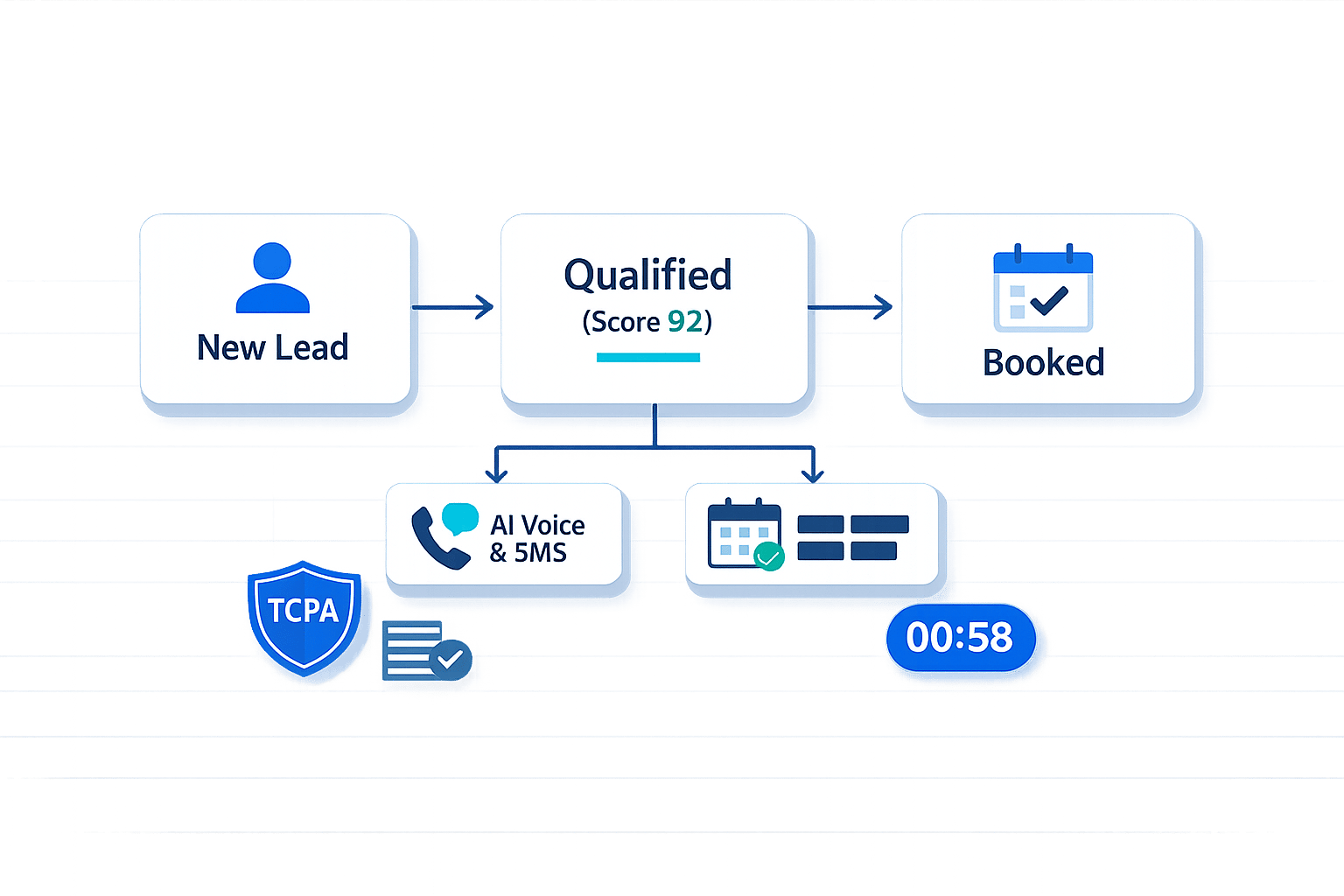
How to Qualify Insurance Leads Faster With Automation
Life insurance agents often lose clients due to slow lead response times and manual processes. Automation solves this by engaging leads instantly, ensuring no opportunities are missed. Tools like The Standard CRM use AI to qualify leads in real time, route them to the right agents, and schedule appointments automatically. Here’s how automation helps:
- Faster Response Times: Contact leads within seconds, increasing conversion rates by up to 4x.
- Real-Time Qualification: AI gathers key info like coverage needs, budget, and timelines.
- Lead Scoring: Automatically ranks leads by intent, so agents focus on high-potential prospects.
- Seamless Routing: Assigns leads to agents based on expertise or location.
- Compliance: Ensures adherence to regulations like TCPA and DNC rules.
- Data Accuracy: AI updates and organizes lead profiles automatically, reducing errors by 90%.
How to Define Your Ideal Lead Profile for Automation
Defining your ideal lead profile is crucial for consistent lead scoring and routing. This ensures your agents can concentrate on high-intent prospects, giving them the attention they deserve right away.
Key Qualification Data Points for Life Insurance Leads
To create an effective lead profile, focus on these essential data points:
- Coverage Type: Identifies whether the lead needs term life, whole life, or IUL coverage, helping you assign the right specialist or product line.
- Household Income Range: Assesses if the prospect aligns with a specific product tier and if they can realistically afford the premiums.
- Timeline and Urgency: Differentiates between someone ready to purchase now and someone casually browsing months ahead of a renewal.
- Basic Health and Lifestyle Information: Offers key underwriting insights and helps avoid unexpected issues later in the process.
- Geographic Eligibility: Confirms the prospect resides in a state where your agent is licensed to operate.
- Decision Authority: Verifies if the person filling out the form is the buyer or just gathering information for someone else.
- Current Coverage Status: Indicates if the lead is a first-time buyer or considering switching providers, shaping your follow-up strategy.
"The goal isn't qualifying everyone in. It's identifying prospects with genuine conversion potential so you can focus your time where it counts." - Datagrid
These data points lay the groundwork for automated routing, allowing you to segment leads into tiers based on their readiness to buy.
How to Sort Leads Into Tiers
Once you've gathered the key data points, segment your leads into tiers to reflect their likelihood of conversion. A straightforward three-tier model works well for most life insurance agents:
| Lead Tier | Characteristics | Automation Action |
|---|---|---|
| Tier 1 - High Intent | Meets all ideal criteria; ready to buy; budget confirmed | Immediate agent alert or live transfer; same-day follow-up |
| Tier 2 - Warm | Meets criteria but has a 3–6 month timeline | Nurture sequence with targeted, product-specific content |
| Tier 3 - Cold | Out of territory, lacks budget, or just browsing | Tag for future re-engagement; provide self-service resources |
This tiering system ensures your most promising leads (Tier 1) receive immediate and personalized attention, while Tier 2 and Tier 3 leads are still nurtured effectively. Research highlights that poor lead tiering can significantly reduce contact rates for high-intent prospects. By focusing on Tier 1 leads quickly, agents can maximize conversion opportunities, while automated workflows for Tier 2 and Tier 3 leads keep your agency top-of-mind without overloading your team.
The Standard CRM simplifies this process by automatically routing leads into the appropriate workflows based on the qualification data collected during the initial AI-driven conversation.
sbb-itb-b54a2b8
How to Capture Leads and Collect Data Automatically
Once you've defined your lead tiers, the next step is to ensure every lead entering your pipeline is captured and organized without manual effort.
Connecting Lead Sources to The Standard CRM
Life insurance agents often gather leads from web forms, Facebook ads, and third-party aggregators. The challenge? Quickly consolidating all that data in one system without manual input.
The Standard CRM solves this by connecting to these sources using webhooks and APIs. Webhooks enable instant data transfer, while third-party integrations require some initial field mapping to align data formats. Email inquiries, which often contain unstructured text, are handled by AI parsing tools that extract key details like coverage type, budget, and contact information. These tools automatically populate the relevant CRM fields.
This integration keeps your pipeline clean and ensures your data flows smoothly, setting the stage for immediate lead engagement and qualification.
Using AI to Qualify Leads in Real Time
Speed matters. Research shows that 78% of insurance sales go to the first agency that makes contact. That’s why The Standard CRM uses AI to engage leads within seconds of submission through SMS, email, or phone.
"The gap between a 12% conversion rate and a 20% conversion rate in insurance is not a creative problem or a media spend problem. It's a response time and qualification problem." - Devashish Mamgain, CEO, Kommunicate
The AI conducts brief conversations to gather essential details like coverage type, budget, timeline, and eligibility. This information automatically populates CRM fields, ensuring Tier 1 leads arrive with complete profiles. As Devashish Mamgain explains, "The bot does the data entry. The agent does the closing."
This instant data capture speeds up qualification, making it easier to close high-intent prospects. By automatically filtering out about 60% of unqualified leads - whether due to location, lack of interest, or mismatched product needs - your agents can focus on the leads that truly matter.
Staying Compliant in Automated Lead Interactions
While speed and accuracy are crucial, regulatory compliance is non-negotiable. Automating outreach doesn't mean ignoring important regulations. In the U.S., compliance with the TCPA (Telephone Consumer Protection Act) and Do Not Call (DNC) registry rules is essential to avoid costly penalties.
The Standard CRM handles compliance seamlessly. It scrubs phone numbers against federal and state DNC registries before initiating contact, enforces quiet-hour rules based on local time zones (typically restricting outreach to between 8:00 AM and 9:00 PM), and ensures AI agents clearly identify themselves and the agency at the start of each interaction. For leads involving health-related data, the system uses field-level encryption to protect sensitive information.
To ensure legal coverage, the system secures prior express written consent during lead acquisition. Your landing pages and web forms include mandatory consent checkboxes that explain automated outreach may follow. This ensures your automated workflows are compliant from the very beginning.
With compliance in place, agents are ready to move on to automated lead scoring and appointment scheduling.
How to Set Up Automated Lead Scoring and Routing
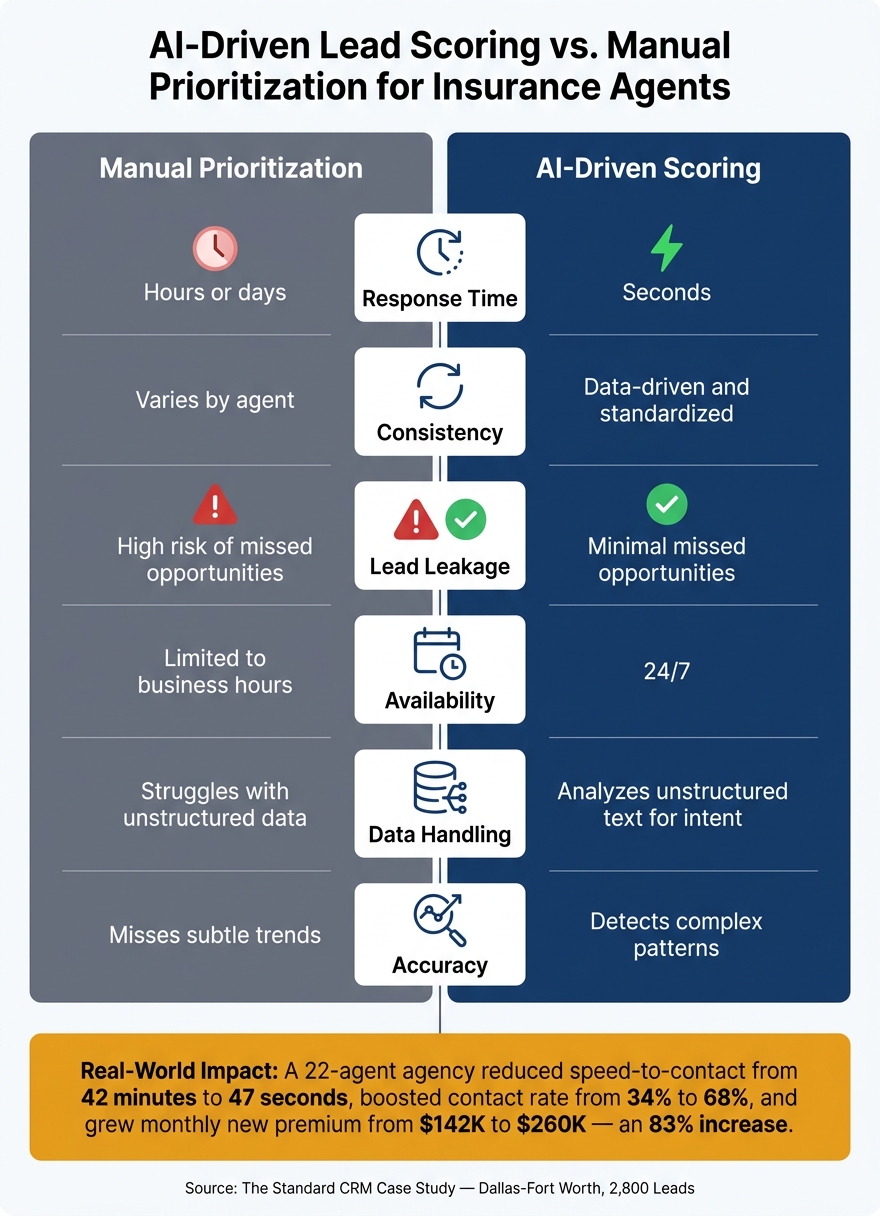
AI-Driven Lead Scoring vs. Manual Prioritization for Insurance Agents
When it comes to handling leads, speed and precision are everything. Automated lead scoring and routing ensure that high-potential prospects get to the right agent without delay. Let’s break down how to set this up effectively.
How to Set Lead Scoring Rules
Lead scoring is all about assigning a numerical value to each prospect based on how well they fit your ideal customer profile and how engaged they are with your outreach efforts. The higher the score, the more promising the lead.
To get started, analyze your last 20 closed deals. Look for trends - like age groups, types of coverage, budget ranges, or even specific zip codes - that define a valuable prospect. Once you’ve identified these patterns, assign point values to a mix of demographic and behavioral factors.
Here’s an example of a scoring system:
| Action / Attribute | Score |
|---|---|
| Submits a quote request form | +25 points |
| Visits a service page 2+ times | +15 points |
| Job title matches ideal customer profile (e.g., Business Owner) | +15 points |
| Opens a pricing email | +10 points |
| Downloads a policy guide | +10 points |
| No engagement in 60 days | −15 points |
| Unsubscribes from email | −20 points |
Once you’ve set up your scoring framework, define thresholds for action. For instance:
- Leads above 60 points could be labeled "hot" and routed directly to an agent.
- Scores between 30 and 59 might enter a nurturing sequence.
- Leads under 30 might go into long-term drip campaigns.
Tools like The Standard CRM can analyze historical data to spot patterns that aren’t immediately obvious, such as seasonal trends or high-converting zip codes. This helps refine your scoring system even further, ensuring every lead is evaluated with consistency.
Automating Lead Routing and Appointment Scheduling
For "hot" leads, timing is everything. Studies show that every minute of delay reduces the likelihood of making contact. That’s why systems like The Standard CRM route high-scoring leads to the right agent in under 60 seconds.
You can configure routing logic in several ways:
- Round-robin distribution: Ensures leads are distributed evenly across agents.
- Best-match routing: Assigns leads based on an agent’s expertise, state licensing, or geographic focus.
- Tiered routing: Sends the most promising leads to your top-performing agents.
If no agent is available, the system keeps the lead engaged by queuing a callback, sending an automated SMS, or scheduling an appointment directly on the agent’s calendar.
AI-Driven Scoring vs. Manual Prioritization
Manual lead prioritization can be inconsistent and slow. Without a standardized process, high-intent leads may sit idle for hours. On average, insurance agencies take 47 minutes to respond to a new lead - plenty of time for competitors to swoop in.
AI-driven scoring eliminates these delays. It evaluates every lead against the same criteria in real time, regardless of when they come in or how busy your team is. This ensures that every qualified lead is handled efficiently.
Here’s a quick comparison:
| Feature | Manual Prioritization | AI-Driven Scoring |
|---|---|---|
| Response time | Hours or days | Seconds |
| Consistency | Varies by agent | Data-driven and standardized |
| Lead leakage | High risk of missed opportunities | Minimal missed opportunities |
| Availability | Limited to business hours | 24/7 |
| Data handling | Struggles with unstructured data | Analyzes unstructured text for intent |
| Accuracy | Misses subtle trends | Detects complex patterns |
To illustrate the impact, consider a 60-day pilot program at a 22-agent insurance agency in the Dallas-Fort Worth area. After implementing AI-powered lead scoring and routing for 2,800 leads, their speed-to-contact dropped from 42 minutes to just 47 seconds. They were the first to call on 91% of shared leads, boosting their contact rate from 34% to 68%. As a result, their monthly new premium written jumped from $142,000 to $260,000 - an impressive 83% increase.
How to Build Automated, Personalized Follow-Up Sequences
Once you've scored and routed your leads, the next step is keeping them engaged - without spending hours on manual follow-ups. Automated sequences, powered by AI-driven scoring, ensure every prospect gets timely, tailored communication at every stage of your sales process.
Follow-Up Strategies for High-Intent Leads
High-intent leads demand immediate action. When a hot lead enters your system, The Standard CRM springs into action, sending a personalized SMS and branded email (complete with a calendar booking link) within 90 seconds. If the lead doesn't pick up the first call, a pre-recorded ringless voicemail is sent automatically. Every message is customized with personalization tokens like the lead's first name, requested coverage, and the agent's name to keep the communication feeling personal.
For leads that don't respond right away, a 7-day multi-channel sequence keeps the conversation alive by emphasizing urgency, value, and social proof.
"The speed-to-contact gap is the largest controllable driver of insurance agency revenue loss." - US Tech Automations
If those high-intent leads remain silent, the system shifts to a structured sequence to maintain engagement, while warm and cold leads follow a longer-term strategy.
How to Nurture Warm and Cold Leads Over Time
Not every lead is ready to make a decision today. Warm and cold leads require a steady, consistent approach. Data shows that it takes 7 to 8 touches, on average, to schedule a qualified meeting, so persistence is key.
For warm leads, consider setting up a drip sequence that spans 30 to 60 days. Instead of sending generic messages, use the data you’ve already collected - like coverage type, age range, or previous interactions - to craft relevant follow-ups. For instance, if someone downloaded a guide on term life policies, send them emails that dive deeper into term coverage details. With The Standard CRM, behavior-based triggers adjust your messaging automatically as the lead engages. Whether they open an email, click a link, or download another resource, the system refines its approach to match their level of interest.
Cold leads (under 30 engagement points) benefit from a lighter touch. Monthly updates like articles, short videos, or market insights related to their initial inquiry can help keep your agency in their minds until they’re ready to take the next step.
Keeping Lead Data Accurate With AI
Personalized follow-ups only work if your data is accurate, and this is where AI shines. Outdated contact details, duplicate profiles, and missing information can quietly derail your follow-up efforts.
The Standard CRM uses Natural Language Processing (NLP) to automatically update lead profiles in real time. For example, if a prospect mentions a new baby or a recent home purchase during a call, that information is logged automatically and can even trigger a cross-sell sequence without any manual input. Duplicate leads are flagged and merged based on matching phone numbers or email addresses, ensuring prospects don’t receive multiple overlapping messages. This automation reduces manual data entry errors by 80–90% and keeps your records accurate.
| Data Maintenance Task | Without Automation | With The Standard CRM |
|---|---|---|
| Updating lead profiles | Manual entry after each call | Automatically extracted from conversations |
| Duplicate lead handling | Caught manually (or not at all) | Auto-merged by phone/email match |
| Data entry error rate | High; agent-dependent | Reduced by 80–90% |
| Long-term nurture accuracy | Degrades over time | Maintained in real time |
How to Measure and Improve Your Automated Lead Qualification Process
Once you've automated your engagement and scoring strategies, the next step is to measure how well they're working. It's not enough to set up automation - you need to ensure it’s delivering results. Tracking the right metrics will help you see where your system is excelling and where it might be losing potential revenue.
Key Metrics to Track for Automation Performance
For insurance agents, a few key metrics stand out. The most important is speed-to-lead - your automation should ensure the first contact happens within five minutes. This quick response is crucial for effective lead qualification. Another critical metric is the contact rate, which measures the percentage of leads that turn into meaningful conversations. Automated multi-channel outreach can boost this rate from a typical 30–50% to over 70%.
You should also monitor your quote conversion rate. Automation can improve this by 15–20 percentage points, showing how well your system turns conversations into quotes. Another important metric is lead leakage rate, which tracks the percentage of inquiries that go unaddressed. While the industry average ranges from 30% to 90%, a well-optimized system can bring this close to zero. Finally, measure time saved per agent. By automating follow-ups, you can reduce manual work by up to 75%, allowing agents to focus on closing deals.
How to Test and Refine Your Workflows
To fine-tune your automated process, start by running it alongside your manual system for two weeks. Compare the results to identify any gaps or discrepancies. Begin with broader qualification thresholds and adjust as you gather real conversion data. For example, if viable leads are being classified as cold but later closed by agents, it’s a sign that your scoring rules need tweaking.
Make sure your agents provide feedback on lead quality, and feed this data back into The Standard CRM to improve the scoring model over time. Additionally, schedule a formal review every 90 days to adapt to seasonal trends and any updates to your product offerings.
"Speed-to-lead powered by AI is the single fastest-payback intervention for most insurance agencies, often covering tool costs within 45 days." - Arete Intelligence Lab
Summary of Key Optimization Levers
Here’s a quick look at adjustments you can make to improve your system’s performance:
| Optimization Lever | Adjustment | Effect on Performance |
|---|---|---|
| Scoring Rules | Increase weight for behavioral signals | Improves lead prioritization accuracy and close rates |
| Follow-up Cadence | Add touchpoints in the first 48 hours | Boosts contact rates; adjust based on engagement data |
| Routing Logic | Match lead complexity to agent specialization | Enhances conversion rates and agent productivity |
| Score Thresholds | Adjust "Hot Lead" point requirements | Balances lead volume with lead quality |
| Response Triggers | Reduce trigger delay to under 90 seconds | Significantly increases qualification and engagement rates |
FAQs
What should I automate first to qualify leads faster?
Automate the pre-qualification process right when a lead comes in. By using conversational AI through tools like landing pages, SMS, chat, or email, you can ask essential screening questions, collect responses in structured CRM fields, and immediately direct high-intent leads to an agent. Meanwhile, lower-intent leads can be added to a nurture sequence. This approach removes delays and keeps lead qualification consistent every time.
How do I set lead score thresholds without losing good leads?
To define lead score thresholds effectively, begin with broad criteria and note essential factors such as household income or policy timelines. Operate your AI system in tandem with manual processing for about two weeks to verify the scoring's accuracy. Use the insights gained to fine-tune your thresholds. Make it a habit to review these thresholds every quarter. For leads with lower priority, direct them into automated nurturing workflows to keep them engaged without losing potential opportunities.
How can automated outreach stay TCPA and DNC compliant?
Automated outreach ensures compliance with TCPA and DNC regulations by following strict protocols. It verifies prior express written consent before initiating contact, cross-checks numbers against the National DNC Registry and internal suppression lists, and halts communication immediately upon receiving opt-out requests.
To stay within legal boundaries, outreach adheres to TCPA dialing windows, limiting contact to 8 AM–9 PM local time. Additionally, calls disclose the AI's identity at the start, maintain audit-ready logs, and update DNC data regularly - typically every 31 days.